
Facebook and Meta AI Policies

To use Facebook, users must accept Meta’s Terms of Service which include Meta AIs Terms of Service. By accepting these terms you are agreeing to not “access, use, or allow others to access or use AIs in any matter that would:” violate any applicable law, harm or present harm to others, present adult content, deceive or mislead others, violate or infringe on the rights of others, solicit professional advice, or override safety controls (Facebook, January 2025).
Reporting AI Content Violating Policy
These policies agreed to by every user allow Facebook to flag and remove AI content that violates these terms and suspend or remove accounts violating the terms. If you see AI content on Facebook that violates these policies, you can report it to Facebook. To report AI content that violates the terms, right click or tap on the three gray dots on the top right corner of the post. Click on “Report post” then you will be able to select a provided option to let them know why you are reporting the post. If you don’t want to select one of the options or you are unsure which one fits best, you can click on the X in the top right corner to close the pop up.
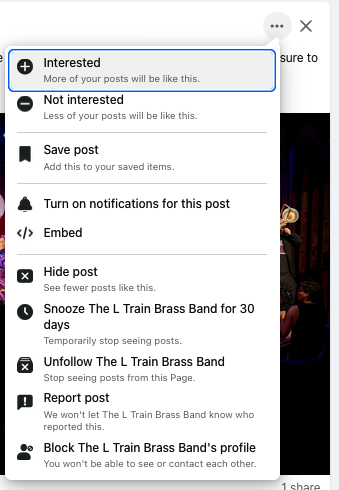
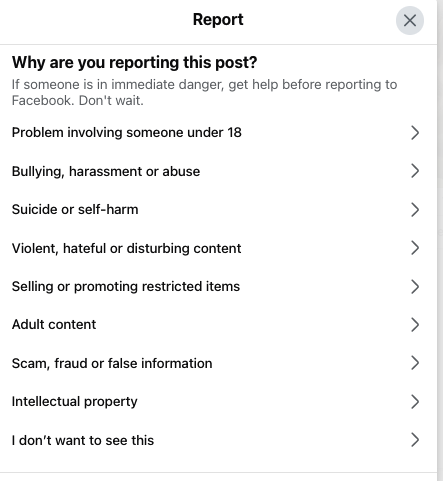
Once you have reported a post, Facebook will replace the post with a message, “Hidden”. You may undo your report by clicking “Undo” on the right or you can click “Content preferences” on the bottom. “Content preferences” will allow you to customize the content you see and how you see it in your feed. You can favorite people or pages to prioritize their posts, snooze people, pages, or groups to stop seeing their posts, unfollow or reconnect with people or pages, and manage defaults to the content in your feed. Manage defaults is useful because there you can increase or decrease the amount of political, low-quality, unoriginal and problematic or sensitive content you see, allowing you more control over your feed.
Facebook. (2025, January 17). Meta AIs Terms of Service. Facebook. https://www.facebook.com/legal/ai-terms